
Efficientix / Efficientix+ / Mobile sales
Mobile sales app: your sales force, connected to the live ERP.
Catalog, prices, inventory and credit checked in NetSuite from the phone. The salesperson quotes and closes during the visit, without calling the office.
How we help
From challenge to value
The challenge
- Outdated catalog, price and inventory information
- Manual order entry with errors and rework
- Tracking limited to opportunities and customers
- Disconnect between the field, administration and operations
- Slow to quote and close on site
Our solution
- Quoting and order taking directly from the phone
- Online access to NetSuite catalogs, prices and inventory
- Tracking of opportunities and sales activities
- Native ERP sync with no double entry
Value for your company
- Shorter sales cycles
- Higher sales force productivity
- Reliable information on every visit
- Fewer order errors
- Complete visibility of sales performance
The problem
What problem do we solve?
When the field salesperson cannot see the ERP, the visit turns into a phone inquiry and the close gets postponed:
What happens today
- Calls to the office to confirm price, inventory and credit
- Orders entered twice: on paper and then in the ERP
- Expired price lists circulating by PDF and WhatsApp
- Opportunities that only exist in the salesperson’s notebook
- Improvised visit routes, with no schedule or evidence
The promise
The ERP travels with the salesperson
The app queries NetSuite live: catalog, authorized price, stock and customer balance. The salesperson quotes, takes the order and moves the opportunity through the pipeline from the phone, with the day’s route at hand.
One visit. One order. Zero re-entry.
Why
Why do sales teams adopt it?
They quote and close during the visit, from the phone
They check real price and inventory, not an old list
They move the pipeline the same day, not at month-end
They plan the day’s route with a geolocated schedule
They eliminate double entry between the field and administration
They measure performance by salesperson, route and customer
A separate CRM only adds data entry. This is NetSuite in the salesperson’s hand, during the visit.
Capabilities
The salesperson's day, organized before heading out
Activities and visits
- Daily schedule by salesperson, with time and customer
- Calls, visits and tasks linked to the NetSuite record
- Visit log with notes and commitments
- Customer history before knocking on the door
Impact: No visit goes without a record or follow-up.
Route on the map
The day’s appointments are placed on the map so the area can be covered sensibly:
- Geolocated appointments in visiting order
- Nearby customers worth an extra stop
- Fewer miles and more visits per day
- Real portfolio coverage, visible to the manager
Impact: The same workday yields more effective visits.
Pipeline by stage
Each opportunity moves from prospecting to close with its amount, probability and estimated date, so the month’s forecast builds itself.
Impact: A reliable forecast, with no reconstruction meetings.
Sales dashboard
- Progress against quota by salesperson and territory
- Stalled opportunities and customers without a visit
- Open quotes and their probability of closing
Impact: The manager sees the pipeline without asking for reports.
Real screens
What the app looks like in operation
Screenshots of the application with demo data.
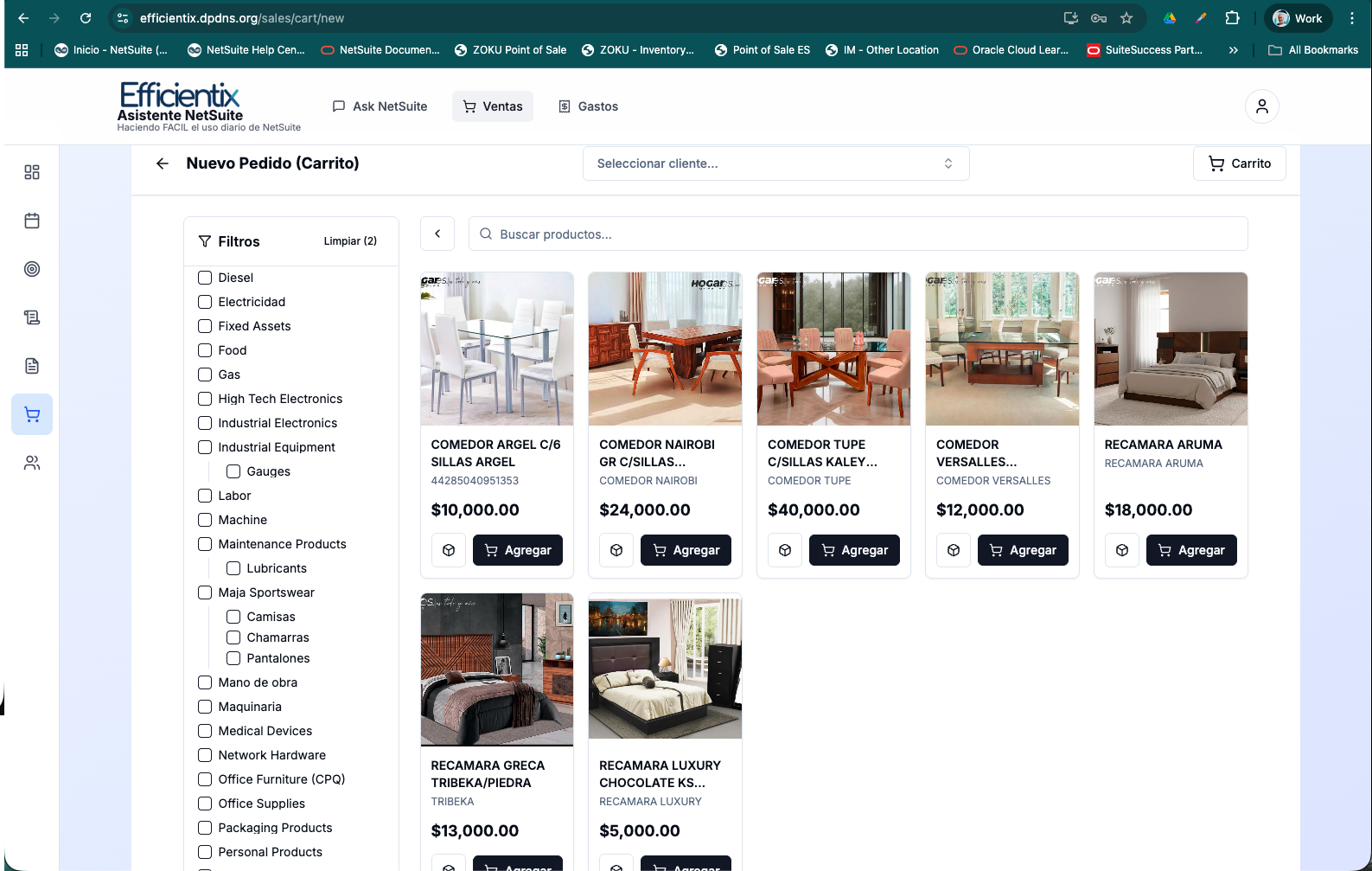
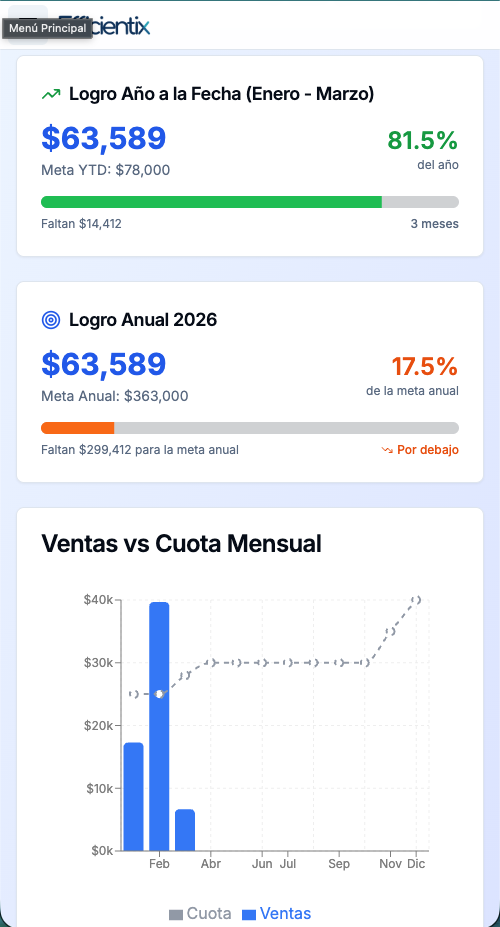
Product at a glance
How it looks in action
Illustrative screen based on the app modules, with sample data.
Comparison
From the notebook and the PDF to the ERP in hand
If NetSuite is your ERP, your sales force should work inside it.
Benefits and return
What changes from the first close
“Before, every visit was a call to the office to confirm prices, inventory and credit. Today the app queries NetSuite live: the salesperson quotes, takes the order and moves opportunities through the pipeline from the phone, with the day’s route at hand.”
— Sales Director · Efficientix client · B2B distribution
Use cases
Every sales force sells differently
Price lists, catalogs and approval flows are configured by team and territory, so it works just as well for a route pre-seller as for a key account executive.
B2B distribution
Route pre-sales with a broad catalog, customer price lists and daily orders.
Consumer goods and groceries
High visit frequency, coverage by territory and display control.
Manufacturing
Technical quotes with plant stock and delivery times.
Key accounts
Long cycles with several stages, activities and follow-up by contact.
Mixed teams
In-house salespeople and representatives, with the same information and rules.
Your model isn't here? We configure the catalog, prices and pipeline stages to your sales operation.
Requirements and support
What you need to put it into operation
Technical requirements
- Active Oracle NetSuite account (OneWorld or standard)
- SuiteApp installed from the Efficientix bundle
- iOS or Android devices with mobile data
- Catalog, price lists and customer portfolio by salesperson
- Pipeline stages and approval rules defined
Support service
Included for the duration of the subscription:
- Access to the support center for up to 2 users
- Case tracking from intake to resolution
- SuiteApp updates included
- Training for salespeople and sales management
The cycle of a visit
More from Efficientix+
Other apps that integrate with NetSuite
POS
Floor operations connected to inventory, invoicing and accounting: ticket, payment and invoice in a single operation.
Learn moreSuite Fiscal
Integrated, accessible tax information ready to operate: SAT bulk download, CFDI management and reconciliation in NetSuite.
Learn moreDemand planning
Forecast sales, adjust inventory and reduce stock-outs or excess stock with real-time data, without relying on spreadsheets.
Learn moreIndustries where it fits best:
Use cases by industry
Where Mobile sales app is used
Retail
For field or wholesale customers, the mobile sales app takes orders against the same catalog, prices and inventory the store uses.
Learn moreFood and beverage
The mobile sales app lets your sellers and route reps take orders at stores with live prices and inventory.
Learn moreWholesale and distribution
The mobile sales app takes orders in the field with the catalog, customer prices and NetSuite inventory, with no double entry.
Learn moreManufacturing
The mobile sales app takes customer orders against real availability and sends them straight to planning.
Learn moreLivestock
The mobile app lets you record receiving, movements and weights at the pen with the information reaching NetSuite without double entry.
Learn moreTransportation and logistics
The mobile app records services, evidence and on-route expenses and sends them to NetSuite with no double entry.
Learn moreTelecom and cable (FTTH)
The mobile app takes installation and service orders to crews and records progress and equipment used.
Learn moreFAQ
Questions, answered
What does the mobile sales app do?
It lets your team quote, take orders and follow up on opportunities from a phone, with live NetSuite catalog, prices and inventory.
Do orders have to be entered twice?
No. The app syncs natively with NetSuite, so the order is created once and there is no double entry.
What kind of company is it for?
For companies with field sales teams, such as distribution and wholesale, that need reliable information at every visit.
// NETSUITE
Let's talk about your NetSuite project.
Tell us which system you run today and what you want to solve. We will propose the next step.
Operating in Mexico?
Does your company have a subsidiary in Mexico?
Run it in the same NetSuite as your U.S. headquarters. MX+ localization brings CFDI 4.0, DIOT and electronic accounting built in, with support in English and Spanish.